Appearance
MutationObserver
概念
当 DOM 变化时,可以异步执行回调监听 DOM 的变化 监听范围:document, dom subtree, single element, attributes, childNodes, textNode
兼容性
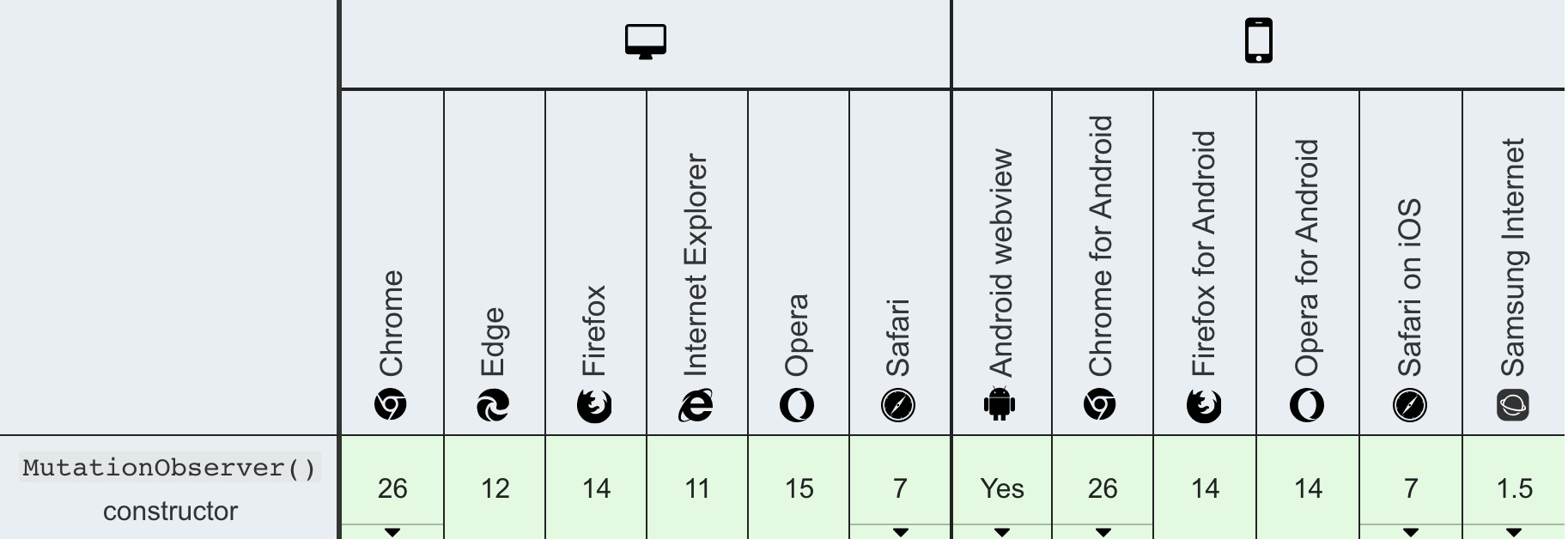
用法
js
let observer = new MutationObserver(() => console.log('DOM was mutated!'));let observer = new MutationObserver(() => console.log('DOM was mutated!'));API
api 介绍
observe 方法
js
let observer = new MutationObserver(() => {
  console.log('document has changed!!!');
});
observer.observe(document.body, { attributes: true });
document.body.className = 'hello';
console.log('document body class names changed');
let observer = new MutationObserver(() => {
console.log('document has changed!!!');
});
observer.observe(document.body, { attributes: true });
document.body.className = 'hello';
console.log('document body class names changed');callback mutation records 回调参数属性分析
js
let observer = new MutationObserver(mutationRecords => {
  console.log(mutationRecords);
});
observer.observe(document.body, { attributes: true });
document.setAttrbute('a', 'b');

// part I
// result [mutationRecords]
/*
    {
        addedNodes: NodeList(0)
        attributeName: 'b',
        attributeNamespace: null
        nextSibling: null
        oldValue: null
        previousSibling: null
        removedNodes: NodeList []
        target: body
        type: "attributes"
    }
*/

// part II
// setAttributeNS
document.body.setAttributeNS('a', 'b', 'c');
// [mutationRecords]
/*
    {
        addedNodes: NodeList(0)
        attributeName: 'b',
        attributeNamespace: 'a'
        nextSibling: null
        oldValue: null
        previousSibling: null
        removedNodes: NodeList []
        target: body
        type: "attributes"
    }
*/

// part III
document.body.className = 'a';
document.body.className = 'b';
document.body.className = 'b';
/*
    [mutationRecords, mutationRecords, mutationRecords]
*/
let observer = new MutationObserver(mutationRecords => {
console.log(mutationRecords);
});
observer.observe(document.body, { attributes: true });
document.setAttrbute('a', 'b');
// part I
// result [mutationRecords]
/*
{
addedNodes: NodeList(0)
attributeName: 'b',
attributeNamespace: null
nextSibling: null
oldValue: null
previousSibling: null
removedNodes: NodeList []
target: body
type: "attributes"
}
*/
// part II
// setAttributeNS
document.body.setAttributeNS('a', 'b', 'c');
// [mutationRecords]
/*
{
addedNodes: NodeList(0)
attributeName: 'b',
attributeNamespace: 'a'
nextSibling: null
oldValue: null
previousSibling: null
removedNodes: NodeList []
target: body
type: "attributes"
}
*/
// part III
document.body.className = 'a';
document.body.className = 'b';
document.body.className = 'b';
/*
[mutationRecords, mutationRecords, mutationRecords]
*/mutation records
target
改变的目标结点
type
三种类型 attributes, characterData, childList
oldValue
- MutationObserverInit => attributes, characterData 替换值
- childList: null 总是 null
attributeName
- 属性名
attributeNamespace
- 返回属性名的命名空间
addedNodes
- childList 改变 返回 NodeList 默认 NodeList[]
removedNodes
- childList 改变,返回 NodeList 删除结点 默认 null
previousSibling
- childList 改变,返回前一个结点 默认 null
nextSibling
- childList 改变,返回后一天结点 默认 null
disconnect 关闭连接
关闭监听改变
js
let observer = new MutationObserver(() => {
  console.log('changed');
});
observer.observe(document.body, { attribute: true });
document.body.className = 'hello';
// 第一种情况
// 立即关闭
observer.disconnect();
// 没有打印

// 第二种情况
// 但是代码放在settimeout中,仍然可以监听改变
setTimeout(() => {
  observer.disconnect();
  document.body.className = 'world';
}, 0);
// 打印出来 'changed'
let observer = new MutationObserver(() => {
console.log('changed');
});
observer.observe(document.body, { attribute: true });
document.body.className = 'hello';
// 第一种情况
// 立即关闭
observer.disconnect();
// 没有打印
// 第二种情况
// 但是代码放在settimeout中,仍然可以监听改变
setTimeout(() => {
observer.disconnect();
document.body.className = 'world';
}, 0);
// 打印出来 'changed'Multi MutaintionObserver(多监听改变)
js
// MutationObserver 可以监听多个元素 dom 改变
let observer = new MutationObserver(mutationRecords => {
  console.log(mutationRecords.map(x => x.target));
});
let div = document.createElement('div');
let span = document.createElement('span');
document.body.appendChild(div);
document.body.appendChild(span);
// 监听
observer.observe(div, { attributes: true });
observer.observe(span, { attributes: true });
div.setAttribute('a', 'b');
span.setAttribute('a', 'b');
// 打印情况 [div, span]

observer.disconnect();
// 关闭监听 没有打印
// MutationObserver 可以监听多个元素 dom 改变
let observer = new MutationObserver(mutationRecords => {
console.log(mutationRecords.map(x => x.target));
});
let div = document.createElement('div');
let span = document.createElement('span');
document.body.appendChild(div);
document.body.appendChild(span);
// 监听
observer.observe(div, { attributes: true });
observer.observe(span, { attributes: true });
div.setAttribute('a', 'b');
span.setAttribute('a', 'b');
// 打印情况 [div, span]
observer.disconnect();
// 关闭监听 没有打印重新使用 MutationObserver 实例
对于 MutationObserver 来说,disconnect 不是结束生命的事件,相同实例还可以重新唤起 MutationObserver 改变
以下代码片段在两个连续异步代码块中重新连接
js
let observer = new MutationObserver(() => {
  console.log('document.body changed!!!');
});
observer.observe(document.body, { attributes: true });
document.body.className = 'hello';
// console changed
setTimeout(() => {
  observer.disconnect();
  document.body.className = 'world';
  // 没有打印
}, 0);

setTimeout(() => {
  observer.observe(document.body, { attributes: true });
  document.body.className = 'world';
  // console changed
}, 0);
let observer = new MutationObserver(() => {
console.log('document.body changed!!!');
});
observer.observe(document.body, { attributes: true });
document.body.className = 'hello';
// console changed
setTimeout(() => {
observer.disconnect();
document.body.className = 'world';
// 没有打印
}, 0);
setTimeout(() => {
observer.observe(document.body, { attributes: true });
document.body.className = 'world';
// console changed
}, 0);observe 方法第二个参数对象有哪些属性
js
let observer = new MutationObserver(/* ... */, {
    subtree: false,
    attributes: false,
    attributeFilter: [], // string 数组
    attributeOldValue: false,
    characterData: false,
    characterDataOldValue: false,
    childList: false,
})
let observer = new MutationObserver(/* ... */, {
subtree: false,
attributes: false,
attributeFilter: [], // string 数组
attributeOldValue: false,
characterData: false,
characterDataOldValue: false,
childList: false,
})参数属性介绍
subtree
默认为 false,如果为 false,只监听目标元素的改变,如果为 true,目标元素以及整个结点子树都将被监听改变
attributes
节点的属性改变时,默认为 false
attributeFilter
过滤那些节点的属性不被监听改变,默认观察为所有属性
attributeOldValue
返回属性改变的上一个值,默认为 false
characterData
监听节点的字符数据改变 => text 文本 comnent 注释 nodes 节点,默认为 false
characterDataOldValue
返回字符数据改变的上一个字符,默认为 false
childList
监听目标节点的子节点的变化,默认为 false
MutationObserver 设计规范
规范是为性能而设计的,其设计的核心是异步回调和记录队列模型。为了允许在不降低性能的情况下注册大量的突变,每个合格的突变(由观察者实例决定)的信息被捕获到一个MutationRecord中,然后被记录到一个记录队列中。这个队列对于每个MutationObserver实例是惟一的,它表示每个DOM突变的有序记录。
异步回调和记录队列
每次MutationRecord被添加到MutationObserver的记录队列时,观察者回调(最初提供给MutationObserver构造函数)只有在没有已经调度的回调微任务时才被调度为微任务,例如队列长度为> 0。这确保记录队列的内容没有双重回调处理。
有可能,在回调的微任务异步执行时,发生的变化比最初计划回调微任务的变化更多。当MutationRecord实例出现在记录队列中时,会向被调用的回调传递一个数组。回调函数负责完整地处理数组中的每个实例,因为它们不会在函数之后持久存在退出。在回调执行之后,预期不再需要每个MutationRecord,因此记录队列被清空,其内容被丢弃
takeRecords() 方法
使用takeRecords()方法来耗尽MutationObserver实例的记录队列。这将返回队列中存在的MutationRecord实例数组,并清空队列本身
当你想调用disconnect()时,又想处理没有结束(pending状态)的mutaion records 实例时,调用takeRecords()方法,这就达到了关闭的效果
性能分析
将突变回调的执行委托给一个微任务,可以确保避免事件的同步性和随事件而来的混乱。MutationObserver规范的记录队列实现确保即使是大量的突变事件也不会阻塞浏览器。